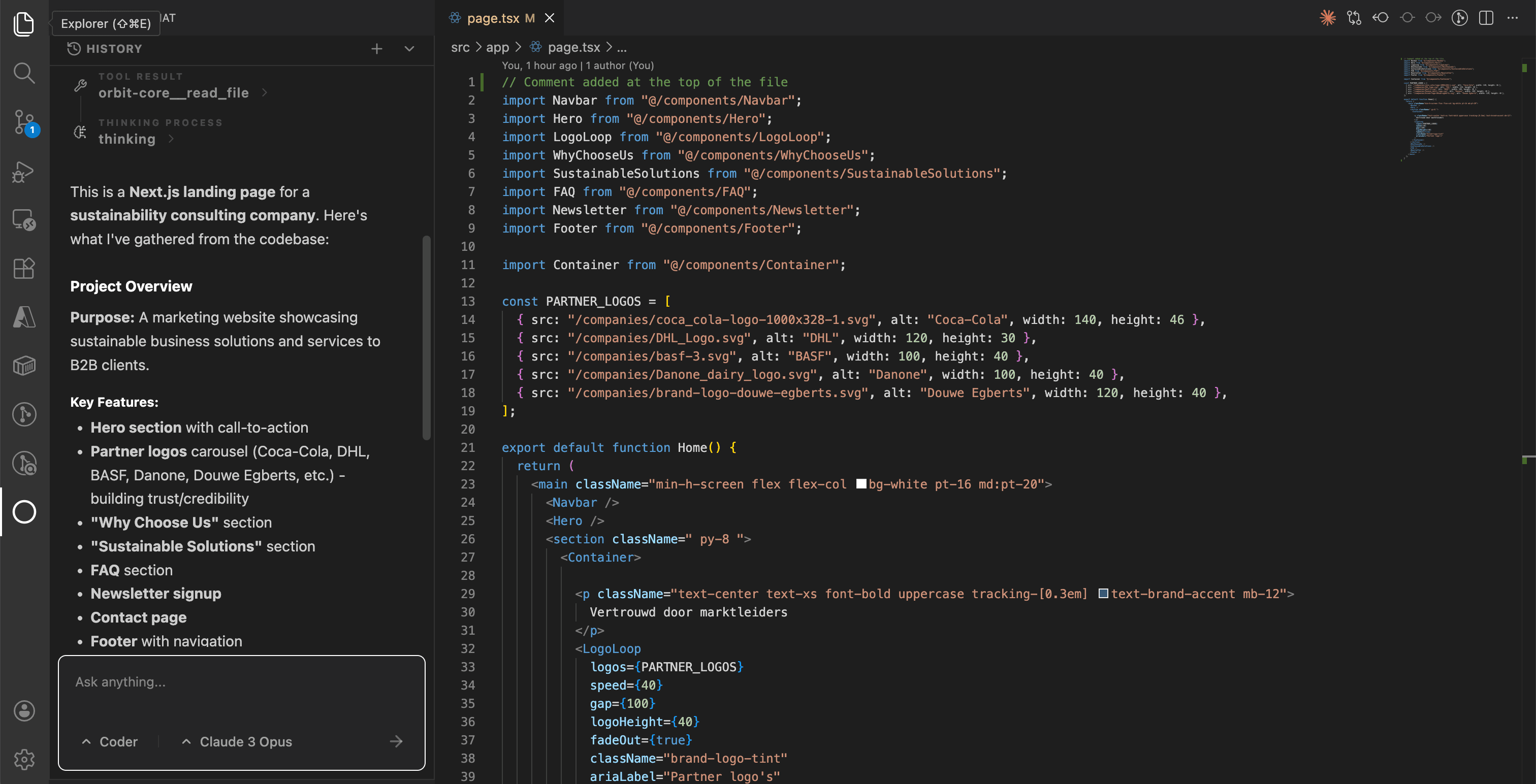
Building Orbit: Exploring AI Agents Through a Modular Coding Tool
A lightweight but powerful experiment in AI agent architecture, focused on modular design, UI/UX, and full control over agent logic.
Building Orbit: A Simple Project That Got Deep Fast
The Summary: Orbit started as a small experiment to understand AI agents. It quickly turned into a modular system a VS Code extension that connects tools, models, and agents into a flexible coding environment.
Why I Started Orbit
Orbit is a coding tool similar to Copilot, Cursor, or Antigravity, built as a VS Code extension. I started it as a project to better understand how AI agents actually work under the hood.
At first glance, these systems seem simple. But once you start building one, you realize how deep the architecture really goes. What looks like a clean UI is backed by layers of orchestration, tool usage, and logic.
My goal wasn’t to reinvent the wheel, but to take existing tools and connect them into a cohesive system.
The Core Idea: Keep It Simple
One of the biggest realizations I had is that AI agent systems don’t need to be overly complex.
At its core, you really only need:
- An interface to interact with agents
- A way to create and manage agents
- System prompts and mcp tool configuration per agent
- Support for multiple LLMs via API keys
- A system for agents to manage sub-agents
- Optional skills integration
That’s it.
Everything else can be layered on top.
For example, if you want an agent that can test UIs or replicate websites, You can just integrate something like Playwright through MCP and create a specialized agent around it.
The system becomes powerful not because it does everything by default, but because it can extend into anything.
UI/UX: Learning from the Best
A big motivation behind Orbit was building a tool with strong UI/UX. I want it to feel as smooth and intuitive as tools like Antigravity.
One feature I definitely plan to recreate is artifacts a structured way for the AI to present outputs like plans, code changes, or structured results.
In a coding environment, this makes a huge difference. Instead of dumping text, the AI presents information in a way that’s easy to review, edit, and act on. It turns the AI from a chatbot into a real development partner.
Logic & Architecture: Full Control
For the logic behind Orbit, I want full control over how everything works. I’m not trying to copy existing systems like Claude Code.
I only look at other tools for research or when I hit a dead end. Even then, it’s just for inspiration. I might borrow ideas or patterns, but I always adapt them to fit my own approach.
This project is as much about understanding and designing systems as it is about building a product.
Current State
Orbit is still a work in progress. I only work on it occasionally, so development isn’t linear.
Right now, I’d say it’s about halfway done.
There’s still a lot to build, especially around deeper agent coordination and expanding the system’s capabilities. But the foundation is there, and that’s the most important part.
Also, the name “Orbit” is temporary.
Key Takeaways
This project taught me a few important things:
- AI agents are much deeper than they appear
- Good architecture matters more than adding features
- UI/UX is what makes or breaks these tools
- You don’t need to build everything just connect the right pieces
Orbit is still evolving, but even in its current state, it proves that building your own AI agent system is not only possible it’s incredibly insightful.
Tech Stack
Core Framework & Runtime
- VS Code Extension API (targeting ^1.85.0): The foundation of Orbit as a native VS Code extension
- Node.js: Powers the backend logic of the extension
- TypeScript: Used across the entire project for both backend and frontend
Frontend (Sidebar Chat View)
- React (v18): Builds the UI inside the VS Code sidebar
- Vite: Handles bundling and development for the webview
- Tailwind CSS (v4): Utility-first styling for rapid UI development
- Lucide React: Icon system used across the interface
- React Markdown + Syntax Highlighter: Renders AI responses with full GitHub Flavored Markdown (GFM) support
Status: ~50% Complete